
AI Detects the “Highlights” of Live Performances and Automatically Generates Short Videos for Social Media Beta Version of “AI Highlight Agent” Now Available
~Official launch scheduled for January 2027. To be showcased at Inter BEE 2026~
INISOFT Co.,Ltd.

INISOFT Co., Ltd. (Room 401, VORT AOYAMA, 2-7-14 Shibuya, Shibuya-ku, Tokyo; President and CEO: Jaewung Lee;hereinafter “INISOFT”) has developed “AI Highlight Agent,” a platform that uses AI to analyze live-streamed video and audio in real time to detect key moments and automatically generate short videos and one-line summaries for social media. The beta version will be available starting November 4, 2026.The official launch is scheduled for January 2027. Additionally, the company will showcase this product at “Inter BEE 2026,” to be held at Makuhari Messe starting Wednesday, November 18, 2026, and will offer free trial accounts on a first-come, first-served basis to visitors at its booth.
“INISOFT”
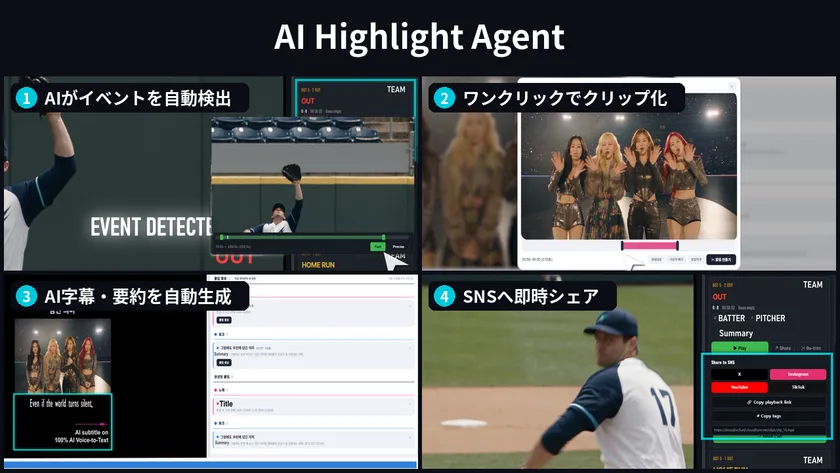
Key Features
Key Features of “AI Highlight Agent”
[Background of “AI Highlight Agent” Development]
At live events such as sports games and concerts, the production of highlight videos and short clips has become indispensable. However, traditional highlight production relies on a two-step manual process: first, an editor watches the footage to identify key moments and edit them, and then a distribution system operator handles the encoding and packaging. This process presents the challenge that the longer the event, the more time the work takes.
Furthermore, concerts and sports matches are often held on weekends, holidays, or at night, requiring a large workforce during time periods when labor costs are relatively high. Since there is a limit to the number of videos a single editor can produce, there is no shortage of content that remains unused and unedited due to cost constraints.
Meanwhile, viewer behavior has changed significantly.According to a survey by the Ministry of Internal Affairs and Communications (*1), the average daily internet usage on weekdays is 228.3 minutes for teens and 266.9 minutes for people in their 20s—significantly exceeding the time spent watching live TV (43.4 minutes for teens and 46.3 minutes for people in their 20s).Furthermore, survey results (※2) show that 34% of sports fans aged 18–24 prefer “clips and highlights” over “entire games,” and the average daily number of views on YouTube Shorts has reached 200 billion (※3).
Drawing on its track record of managing live streams for over 1,000 live events worldwide, INISOFT has developed the “AI Highlight Agent” to address the challenge that “while viewing habits are shifting toward short videos and highlights,manual production cannot keep up.” To address this challenge, INISOFT has developed the “AI Highlight Agent,” a solution that enables the entire process—from generating short videos directly from live streams to posting them on social media—without human intervention.
*1 Ministry of Internal Affairs and Communications, “Survey on Time Spent Using Information and Communications Media and Information Behavior for Reiwa 7” (published June 2026)
*2 YouGov “Sports Whitepaper 2023” (Survey conducted in November 2022, covering 18 markets and over 19,000 respondents; Japan was not included)
*3 YouTube CEO Neil Mohan (June 2025, Cannes Lions keynote speech)
[Features of “AI Highlight Agent”]
1. Automatically detects key moments in real time
It captures live streams in SRT, HLS, and RTMP formats and analyzes video frames and audio in real time using multimodal AI (computer vision, facial recognition, audio classification, and LLM).It simultaneously captures “who, what, and in what context”—a task difficult for a single AI—and detects dramatic moments such as goals, home runs, outs, and key remarks with ultra-low latency.
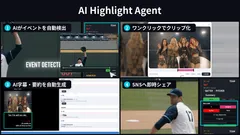
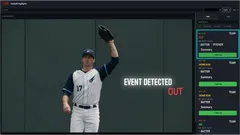
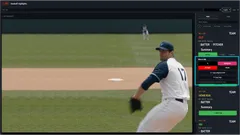
In baseball, when events such as runs or outs are detected, a notification appears on the video feed. A card summarizing the event type (OUT, HOME RUN, RBI, etc.), game status (such as the inning and number of outs), player roles (batter, pitcher, etc.), and a one-line summary of the scene is displayed in a list.
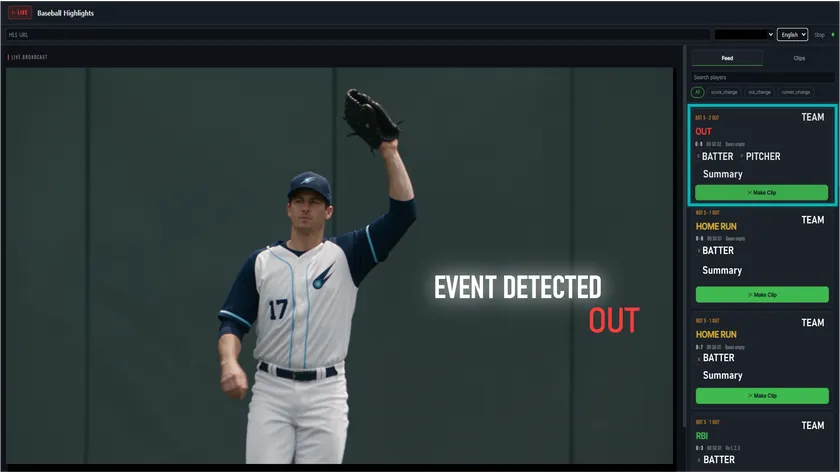
Event Detection (Sports)
AI automatically detects events and displays them as a list of cards (baseball example)
2. Create clips with a single click and post them directly to social media
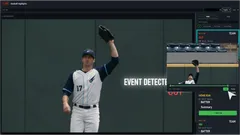
For detected scenes, simply open the trimming screen by clicking the “Make Clip” button and adjust the range using the slider to create a clip. You can choose between two encoding modes—“Fast” and “Precise”—and use preset templates to convert the clip to a social media-friendly format with a single click.
Created clips can be posted to X, Instagram, YouTube, and TikTok with a single click, and you can also copy playback links and hashtags. You can choose between “Auto-Post” and “Post After Approval” depending on your workflow, allowing you to complete the entire process—from event detection to social media posting—right in the middle of a live broadcast.
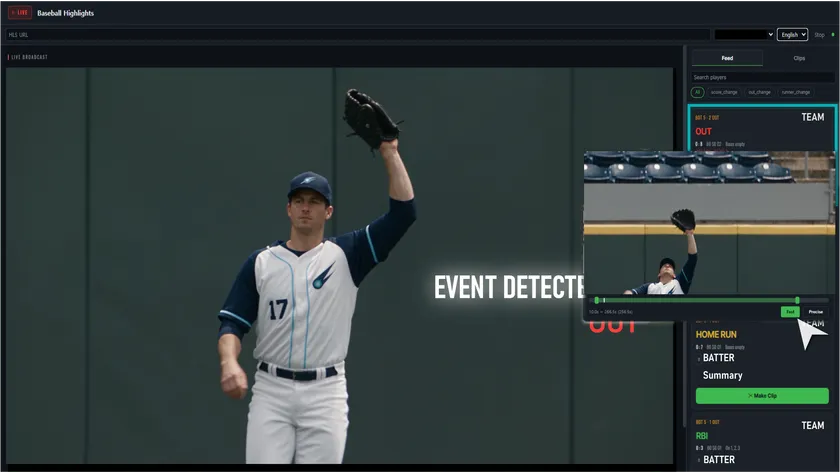
Clip Creation Screen (Sports)
Clip Creation (Trimming) Screen
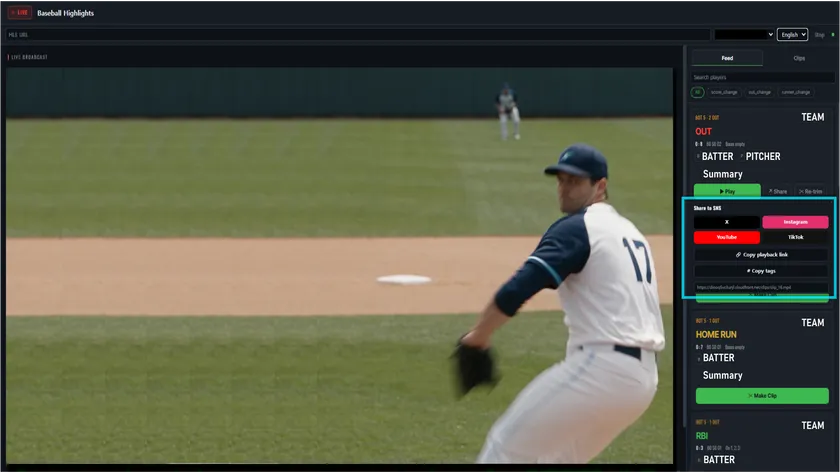
Social Media Posting Screen (Sports)
Social Media Posting Screen
3. Automatic Generation of One-Line Summaries, Hashtags, and AI Captions
A Large Language Model (LLM) automatically generates titles, one-line summaries, and trending hashtags for each scene, allowing you to prepare text for social media posts without manual effort. Additionally, AI speech recognition can automatically display lyrics and spoken dialogue as subtitles on short videos.
4. Support for Concerts and Other Entertainment Events
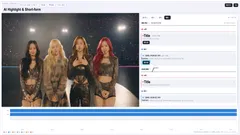
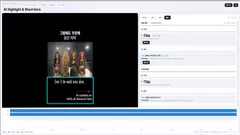
For concerts, the system automatically categorizes performance footage into segments such as “Songs,” “Talks,” “MC,” and “VCR,” which you can review on the timeline. The AI assigns a title and one-line summary to each clip candidate, and you can turn a candidate scene into a clip simply by pressing “Generate Clip.”
Furthermore, for clips longer than one minute, the AI recommends the best 60-second segment, allowing you to trim unnecessary parts before encoding. The finished video is automatically generated as a 9:16 vertical short video (16:9 horizontal format is also supported), and you can automatically insert partner company logos and graphics during export.
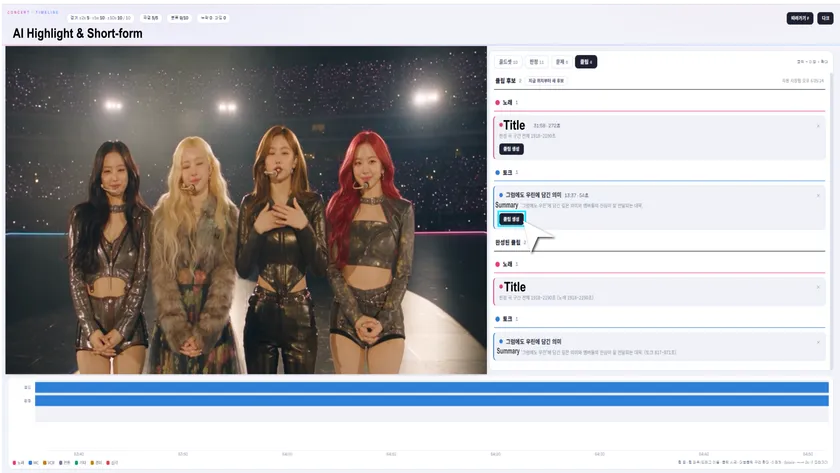
Concert Auto-Classification Screen
Automatic Classification of Concert Content and Clip Suggestions
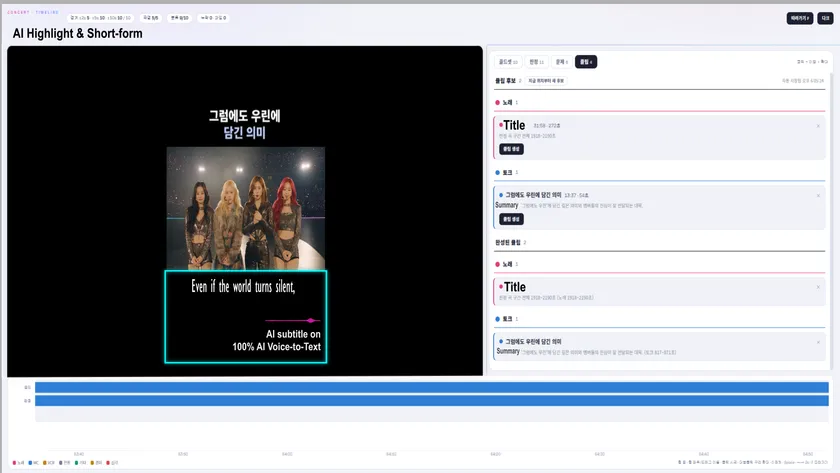
Vertical short video generation screen
Vertical short video generation (with AI subtitles)
(*) Screenshots are from a work-in-progress version (displayed in Korean). The videos featured in this release are AI-generated sample videos.
5. Streamline Operations and Rights Management with Image Dictionaries and Automatic BGM Identification
The “Image Dictionary Engine,” which utilizes facial recognition and data mapping technology, indexes the people in the video and their roles on the timeline, enabling the generation of clips for each athlete or performer. Additionally, by automatically detecting and identifying background music and mapping audio metadata to the timeline, it helps streamline copyright management and the calculation of licensing fees.Even after the event ends, you can use the search function to instantly locate specific scenes and reuse or re-edit the clips.
[Benefits of Implementation]
The implementation of “AI Highlight Agent” eliminates the need for editors to watch footage to find scenes, allowing them to begin editing even while the event is still in progress. In addition to reducing labor costs for highlight production, sharing clips on social media at the height of the excitement drives traffic to the live broadcast. It also creates new sponsorship opportunities through the insertion of branded filler content.
● Significant reduction in labor costs: Dramatically reduces the number of editors and the time they spend on the task
● Driving traffic to the main live stream: Share highlights on social media during the live event to draw viewers to the main stream
● New sponsorship opportunities: Create new value for sponsors through branded filler segments
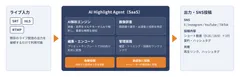
[System Architecture of “AI Highlight Agent”]
“AI Highlight Agent” is provided as a SaaS solution and can be used simply by connecting it to existing live stream outputs (SRT/HLS/RTMP).By configuring input URLs, output formats, branding elements (such as logos), and facial data for performers and athletes in advance, the AI automatically detects, classifies, and generates one-line summaries during the live stream, allowing operators to focus on creating, reviewing, and adjusting clips.
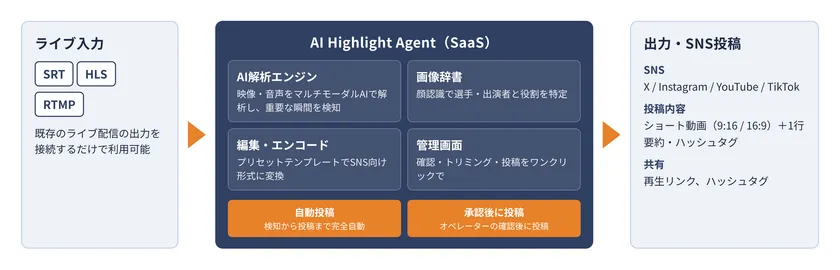
System Architecture Diagram
[Future Developments]
INISOFT plans to introduce support for SGAI (Server Guided Ad Insertion), where AI detects natural breaks in the broadcast—such as when teams switch between offense and defense in baseball—and inserts ads either automatically or upon operator approval.By integrating live streaming, short videos, and ad insertion, we aim to realize a new cycle for monetizing live intellectual property (IP).
[Exhibiting at Inter BEE 2026]
INISOFT will be exhibiting at Inter BEE 2026 (Media Solutions Division). We plan to demonstrate the beta version of “AI Highlight Agent,” introduced in this press release, so please be sure to stop by.
Date: November 18 (Wed) – 20 (Fri), 2026
Location: Makuhari Messe (Booth: 8311 in Hall 8)
URL: https://www.inter-bee.com/ja/
Exhibition Content: https://www.inter-bee.com/ja/forvisitors/exhibitor_info/detail/detail.php?id=236
■ Free Trial Accounts for Booth Visitors
During Inter BEE 2026, we will offer free trial accounts for “AI Highlight Agent” on a first-come, first-served basis to visitors to our booth (availability is limited).
Additionally, visitors who book a “Meeting” via the “Exhibition Details” page linked above will receive priority access to these free trial accounts. We encourage you to book a meeting in advance before visiting our booth.
Please note that prior to providing the free trial account, we will conduct a brief consultation at our booth regarding your anticipated use of the service and other related matters. We appreciate your understanding.

Inter BEE 2026 Banner
■Company Overview
Headquarters
Company Name: INISOFT Co., Ltd.
Representative: Jaewung Lee, President and CEO
Address: A-519, Bundang Suji U-Tower, 767 Shinsu-ro, Suji-gu, Yongin-si, Gyeonggi-do 16827, Korea
Established: 2001
URL: https://www.inisoft.co.kr/
Japan Branch
Name: INI Soft Co., Ltd. Japan Branch
Address: Room 401, VORT AOYAMA, 2-7-14 Shibuya, Shibuya-ku, Tokyo 150-0002
[Customer Inquiries Regarding This Product/This Press Release]
INISoft Co., Ltd. Japan Branch
Contact: Takeshi Nakao
Tel: 03-6805-0810 / 090-4533-4910
E-Mail: sales.japan@inisoft.co.kr
*The company names and product/service names mentioned in this press release are registered trademarks or trademarks of their respective companies. The images shown are works in progress and may differ from the actual product when it is released.
*The people and backgrounds in the images included in this release were created using generative AI.
Image


Logo Image

- Category:
- Services